Main Menu
The Main Menu is used to navigate through Afleet. Selected by the "hamburger" icon visible at the top left of the main screens, it lists the major screens available.
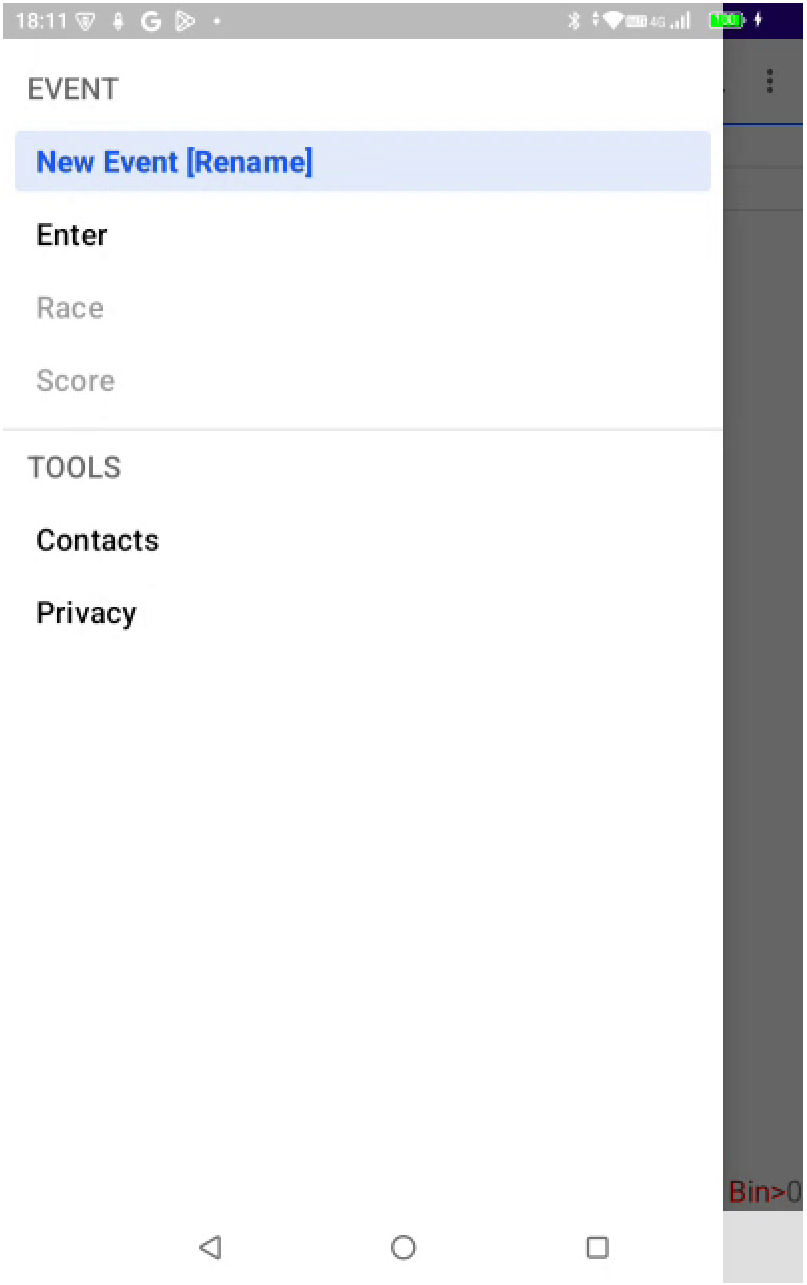
The Main Menu is divided into two sections:
-
EVENT: focussed on a single event, this section of the menu is designed to walk you through the steps required to:
- create an event
- add event entries
- view and set up heats (HMS only)
- score each race
- view and share scores
-
TOOLS: utilities and functionality that apply to multiple events
EVENT
| Menu item | Screen | Purpose |
|---|---|---|
|
Events Screen | List, select, add, change, delete or export events. |
| Enter | Entries Screen | List, select, add, change or delete event entries. |
| Fleet | Fleet Screen | (HMS only). View and manage the Fleetboard; access Fleet Settings. |
| Race | Race Screen | Score a heat; manage heat entries. |
| Score | Score Screen | Display, print or share results. |
TOOLS
| Menu item | Screen | Purpose |
|---|---|---|
| Contacts | Contacts Screen | List and edit skipper names; remove skippers from the dropdown on the Entry Screen. |
| Privacy | Privacy Screen | Display the Afleet privacy policy. |
Appears in